Edit DOCX Online — Free, Private, No Upload

A private DOCX editor in your browser — plus XLSX support

EditDocx is a free online word editor and DOCX editor for Word files. Open .docx in your browser, edit locally, and download DOCX or PDF — 0 server uploads, 0 accounts. Need spreadsheets too? .xlsx editing is included.

EditDocx browser editor interface showing a Word document being edited

Two editors, one private workspace

.docx

Word Documents
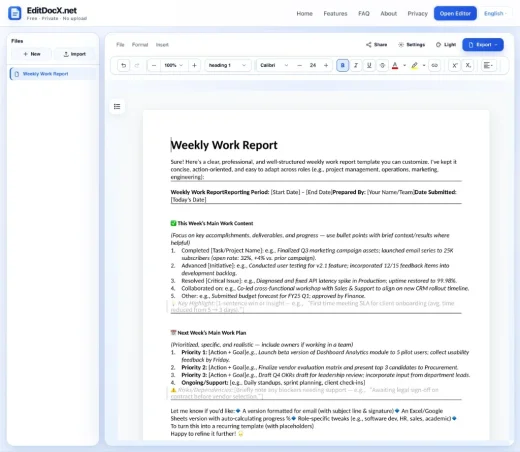
EditDocx Word editor with a DOCX document open

Open Microsoft Word files in a WYSIWYG browser editor. Format text, work with tables and images, review tracked changes, and export when done.

  • Rich text, styles, lists, and tables
  • Images, hyperlinks, and page layout
  • Tracked changes and comments
  • Ctrl/Cmd+S browser checkpoints

Export as DOCX or PDF

Edit DOCX
.xlsx

Excel Spreadsheets

Open Excel workbooks locally with multi-sheet tabs, cell editing, formulas, and basic formatting — no Excel install or Microsoft account.

  • Multiple sheets and cell editing
  • Formulas, merged cells, row and column sizing
  • Bold, colors, alignment, and number formats
  • Download .xlsx when finished

Export as XLSX

Edit XLSX
  • Safe & privateYour files stay on your device — 0 server uploads
  • No accountOpen the editor and import .docx or .xlsx instantly
  • Cross-platformWorks on Chromebook, Mac, Windows, and mobile browsers

Why use this online DOCX editor?

Browser-based DOCX editing

Open .docx files directly in your browser and edit with a WYSIWYG interface. Create new documents, import files via drag-and-drop, and download your changes as DOCX — no desktop app required.

Browser-based XLSX editing

Open Excel .xlsx spreadsheets in your browser with multi-sheet tabs, cell editing, formulas, merged cells, column widths and row heights, and basic formatting. Import via drag-and-drop or File → Import, then download .xlsx when finished. Charts, pivot tables, images, and password-protected workbooks are not supported. See the Excel / XLSX no-upload use case, Excel Online alternative, Google Sheets alternative, and Excel no-signup pages for intent-specific guides.

Rich text formatting and styles

Apply bold, italic, underline, text color, highlighting, fonts, and font sizes. Work with paragraph styles, alignment, line spacing, indentation, and multi-level bulleted and numbered lists — preserving the formatting your DOCX already uses.

Tables, images, and page layout

Insert and edit tables with merged cells, borders, and cell shading. Add images with text wrapping, manage headers and footers, page breaks, and watermarks, and insert hyperlinks, footnotes, and a table of contents. Find and replace text across the document.

Edit DOCX files directly in your browser

WYSIWYG Word editing, spreadsheet tabs with formulas and formatting, drag-and-drop import, explicit browser checkpoints, PDF export, and dark mode — everyday DOCX and XLSX work without installing Office.

EditDocx browser editor interface showing a Word document being edited

When EditDocx fits best

  • Guest PC or library computer — no install rights, no personal cloud login.
  • Contracts and NDAs — 0 server uploads keeps document bytes on your device.
  • Budget or quote spreadsheet — tweak .xlsx locally without installing Excel.
  • Chromebook or school laptop — open .docx or .xlsx in Chrome without Office apps.
  • Quick fix before a meeting — change a few paragraphs or cells and download.
  • Airport or hotel kiosk — download the result and leave no cloud copy behind.

Guides and comparisons

Common questions

View all FAQ

What is EditDocx?

EditDocx is a free online editor at editdocx.net for Word (.docx) and Excel (.xlsx) files. Open files in your browser with 0 accounts, 0 installs, and 0 server uploads. Export to DOCX, PDF, or XLSX.

Is EditDocx a free online Word editor?

Yes. EditDocx is a free online Word and DOCX editor at editdocx.net. Open .docx files in your browser, edit with 0 server uploads, and download DOCX or PDF — no account, install, or subscription.

Can I edit XLSX spreadsheets in EditDocx?

Yes. EditDocx opens Excel .xlsx files in your browser with multi-sheet support, formulas, merged cells, and basic formatting. Download edited spreadsheets as .xlsx. Processing stays local with 0 server uploads.

Is EditDocx a free Excel editor online with no signup?

Yes. Edit Excel / XLSX files with 0 accounts, 0 email gates, and 0 subscription fees. Import, edit, and download .xlsx without registering.

How is EditDocx different from Microsoft Excel Online?

Excel Online requires a Microsoft account and stores workbooks in OneDrive with real-time collaboration. EditDocx requires 0 accounts, performs 0 server uploads, and targets everyday multi-sheet and formula edits — not charts, pivots, or full Excel Online feature parity.

Can I edit Excel files without Google Sheets or Drive?

Yes. EditDocx opens native .xlsx locally without converting through Google Sheets or uploading to Drive. Download stays .xlsx. Use Sheets when you need real-time co-editing or Drive sync.

Ready to edit your DOCX file?

Open the editor and start working on DOCX or XLSX files in seconds.

Open Editor — It's Free